How to Install Dash Cam for a Clean, Reliable Setup
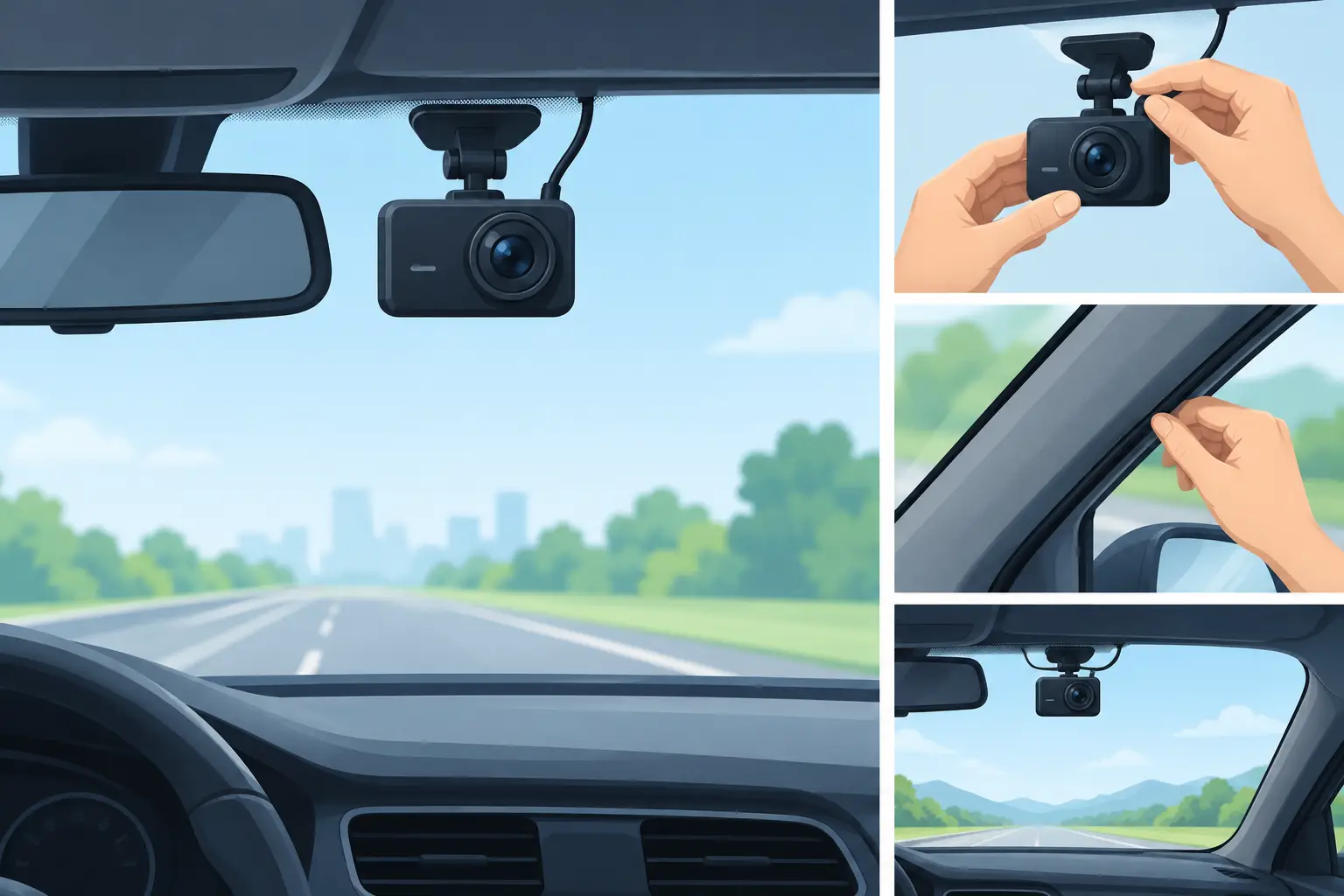
A dash cam should feel like a discreet upgrade, not a distracting gadget dangling from your windshield. Learning how to install dash cam hardware properly gives you a clear record of the road while preserving a polished, uncluttered cabin. Whether you choose a simple front-facing model or a front-and-rear setup with parking surveillance, a careful installation makes the difference between dependable footage and a camera you forget to use.
Choose the Right Dash Cam Setup First
Before mounting anything, decide how you want the camera to work when the vehicle is parked. A basic plug-in installation is the fastest option: the camera powers on with the vehicle through the 12V accessory outlet or USB port. It is an excellent choice for everyday driving, rental vehicles, and anyone who wants a refined result without modifying the vehicle’s electrical system.
Hardwiring is more involved, but it creates the cleanest finish because the power cable disappears behind interior trim. It can also enable parking mode, allowing a compatible camera to record impacts or motion while the car is off. The trade-off is that hardwiring requires a fuse tap, a proper ground point, and a camera kit with low-voltage battery protection. Without that protection, parking mode can drain the vehicle battery.
If you are installing a rear camera, look for a model with a long enough rear cable for your vehicle. Sedans generally offer a simpler route than larger SUVs, hatchbacks, or vehicles with a liftgate. A rear camera can add valuable context after a collision, but it also means more time spent routing cable neatly through the cabin.
What You Need Before You Start
Most dash cam packages include the camera, a windshield mount, a power cable, and an adhesive pad or suction mount. A tidy installation is easier with a few additional basics: a trim tool, microfiber cloth, cable clips if needed, and rubbing alcohol for preparing the glass.
For a hardwired install, you will also need a compatible hardwire kit, fuse taps matched to your vehicle’s fuse style, and a circuit tester or multimeter. Check the dash cam manufacturer’s instructions before buying accessories. Some cameras use USB-C, while others require a specific power connector or voltage converter.
Park on a level surface with good lighting. Turn off the vehicle before routing cables near the fuse box, and keep the keys away from the ignition. If your vehicle has advanced driver-assistance sensors, a heated windshield, or a large camera housing near the rearview mirror, take a moment to identify safe mounting space before applying adhesive.
How to Install Dash Cam on the Windshield
The ideal front-camera location is usually high on the windshield, close to the rearview mirror. From the driver’s seat, the camera should not obstruct your forward view. Many drivers place it on the passenger side of the mirror, where it remains discreet while maintaining a broad view of the road.
Clean the mounting area with rubbing alcohol and let it dry completely. Oils, glass cleaner residue, and dust can weaken adhesive over time, especially during hot summers or freezing winters. If your camera uses a static-cling film, apply that first, smooth out any air bubbles, then attach the adhesive mount to the film.
Aim the lens so the horizon sits roughly in the middle of the frame. Capture a small amount of the dashboard at the bottom if it helps you confirm the camera is level, but avoid pointing the lens too low. The road ahead, lane markings, traffic signals, and license plates should be the priority.
Do not mount the camera over an airbag deployment area, directly on tinted windshield bands that interfere with the view, or in a place where it may block sensors. Local windshield-obstruction rules vary by state, so confirm the placement requirements where you drive. A small, well-positioned camera is often less noticeable and more effective than a larger unit placed too low.
Test the View Before Hiding the Cable
Connect the camera temporarily and review the live image in its display or companion app. Check the view during daylight if possible. Can you read nearby license plates? Is the horizon level? Does the rearview mirror, windshield wipers, or a large portion of the dashboard block the frame?
Make adjustments now. Once the cable is tucked behind trim, moving the mount becomes more inconvenient and may reduce adhesive strength.
Route the Power Cable With Care
For a plug-in installation, run the cable from the camera along the top edge of the windshield toward the passenger side. Use a plastic trim tool to gently tuck it under the headliner. Continue down the A-pillar, beneath the glove compartment area, and toward the power outlet.
The A-pillar requires special care. Many modern vehicles have curtain airbags behind the trim. Do not place the cable across or in front of an airbag path. Instead, tuck the cable behind the weather stripping or route it so the airbag can deploy freely. If you cannot clearly identify a safe path, consult your vehicle manual or ask a qualified installer for help.
Keep the cable taut enough to avoid loops but not so tight that it pulls on the camera mount. A loose wire near the pedals is never acceptable. Route the final section behind lower trim and secure any excess cable away from the driver’s footwell, steering column, and seat tracks.
For a rear camera, start from the front unit and route the cable along the headliner toward the rear of the cabin. The cleanest path usually follows the passenger side. On a sedan, the cable can often tuck behind the rear pillar trim and emerge near the back glass. For an SUV or hatchback, the cable must pass through the flexible rubber boot between the body and liftgate. That step takes patience, but it prevents exposed wiring from spoiling the finish.
Hardwire a Dash Cam for Parking Mode
Hardwiring is a smart choice for drivers who want a more permanent, design-conscious setup. It is also the typical route for parking-mode recording. Most hardwire kits have three connections: constant power, accessory power, and ground.
Constant power connects to a fuse that remains live when the vehicle is off. Accessory power connects to a fuse that turns on only with the ignition. The ground wire attaches to an unpainted metal bolt or factory grounding point. The hardwire kit uses these signals to determine whether the vehicle is driving or parked.
Use a circuit tester to verify each fuse rather than relying only on a fuse-box diagram. Select non-essential circuits when possible, and avoid fuses tied to airbags, brakes, engine management, or other safety-critical systems. Install the correct fuse tap orientation, use appropriately sized fuses, and keep the wiring away from moving parts.
This is a job worth outsourcing if you are unsure about vehicle electrical systems. Professional installation adds cost, but it can be a sensible investment for a newer vehicle, a luxury interior, or a camera system with front, rear, and parking-mode coverage.
Set Up Recording, Storage, and Daily Use
A camera is only useful when it is recording properly. Insert a high-endurance microSD card designed for continuous video recording, then format it using the dash cam’s menu. Standard memory cards may work at first but can wear out quickly under constant heat and repeated recording cycles.
Set the date, time, video resolution, loop recording length, and sensitivity for the G-sensor. If the G-sensor is too sensitive, normal potholes and door closures can lock too many clips. If it is set too low, it may miss an impact worth saving. Start with the manufacturer’s recommended setting and adjust after a week of normal driving.
Review a short daytime clip and, if possible, a nighttime clip. Confirm that audio settings match your preference, Wi-Fi is secured if your model offers it, and the camera starts recording automatically when you drive. Every few months, inspect the mount, clean the lens with a microfiber cloth, and make sure the memory card is still healthy.
A well-installed dash cam adds quiet confidence to every commute, school run, and weekend escape. Choose placement that respects visibility, route wires with safety in mind, and take a few extra minutes to test the footage. The result is a cleaner cabin and a dependable record when the unexpected happens.













Leave a comment